
AI Website Design: How AI Builds and Maintains Business Websites
We recently redesigned Tampa AC Services, a 298-page website (after we removed 281 spammy pages), and changed their WordPress page builder from Elementor to Beaver Builder. This process traditionally presents multiple challenges that require many man-hours to strip out the Elementor code and reformat the pages using Beaver Builder. Claude, however, handled about 60% of the redesign project, lowering our costs and speeding up the process.
Today, AI does real work on designing, managing, and editing websites. Below, I show you how we use it with WordPress and HighLevel sites.
You'll see what AI does well, what can go wrong, and what that means for your website.

Key Takeaways
- AI assistants that support MCP, such as Claude, can now connect directly to a WordPress site and, with the right plugins, build, edit, and maintain pages.
- AI now helps with planning, SEO research, content writing, layout design, the technical build, testing, and ongoing maintenance.
- On our 298-page Tampa AC Services redesign, Claude did about 60% of the work, saving an estimated 100 man-hours.
- We built our 170-page support portal with HighLevel and Claude in about 6 hours; I estimate a designer would need 2 to 3 months.
- HighLevel offers Ask AI, AI Studio, and Funnels & Websites AI for generating and refining pages.
- Letting AI edit your site is a manageable risk with guardrails: limited user permissions, staging sites, provider spending limits, and human review of every page.
- AI handles repetitive bulk tasks while human designers focus on brand strategy, judgment, and the finishing touches.
What Is AI Website Design: How Is AI Used in Web Design Today?
AI website design means using artificial intelligence tools to plan, build, style, and maintain a website.
There are two different types of AI-generated websites.
The first is a do-it-yourself AI website builder. You type a short prompt about your company, and the software generates a starter website in a few minutes. This works for a quick starter page, though it often falls short when you need custom branding, technical search optimization, and room to grow.
The second is professional AI website development, where an experienced web team uses AI across every stage of a real project. Instead of relying on a single prompt, we apply AI step by step:
- Planning: organizing your site structure, navigation menus, and page topics around what your customers actually need.
- Research: running deep SEO research to uncover search terms, page topics, metadata, and redirect needs.
- Content: turning raw client notes and service details into clear pages, landing pages, and tutorials.
- Design and Build: creating layouts, formatting sections, moving pages between builders, and stripping out messy legacy code. A professional designer manually adds finishing touches, raising the website quality to look, feel, and perform as a high-end custom website.
- Testing and Maintenance: checking how pages render, updating outdated posts, adding image titles and alt text, perfecting page metadata, optimizing for speed, and running weekly site updates.
To see how website tools fit your broader marketing plan, read our guide on What Is AI Marketing. Additionally, the Top 13 Ways Businesses Use AI to Succeed has practical ideas beyond your website.
How Do We Use AI to Build and Maintain WordPress Websites?
Our typical website design project flows like this:
- We start by doing research. We connect AI to our tools and guide it through doing the research, fact-checking, and perfecting a game plan that can include the layout structure, visual styling, and click-through behavior. AI doesn't replace the human experts, but it speeds the process by processing data quickly and efficiently.
- Next, we use AI with our image tools to create mockups that include static, high-quality images of the home page and interior pages. These can include branding, color schemes, typography, imagery, and UI finishing touches.
- Then we connect an AI assistant directly to the website. A web designer then guides AI in building the website, coaching and training it to get the site as close as possible to the final product. Lastly, the designer manually finishes the site.
Connecting AI Assistants Directly to WordPress
WordPress powers about 40% of all websites. So direct AI connections can change how millions of business sites get built and maintained.
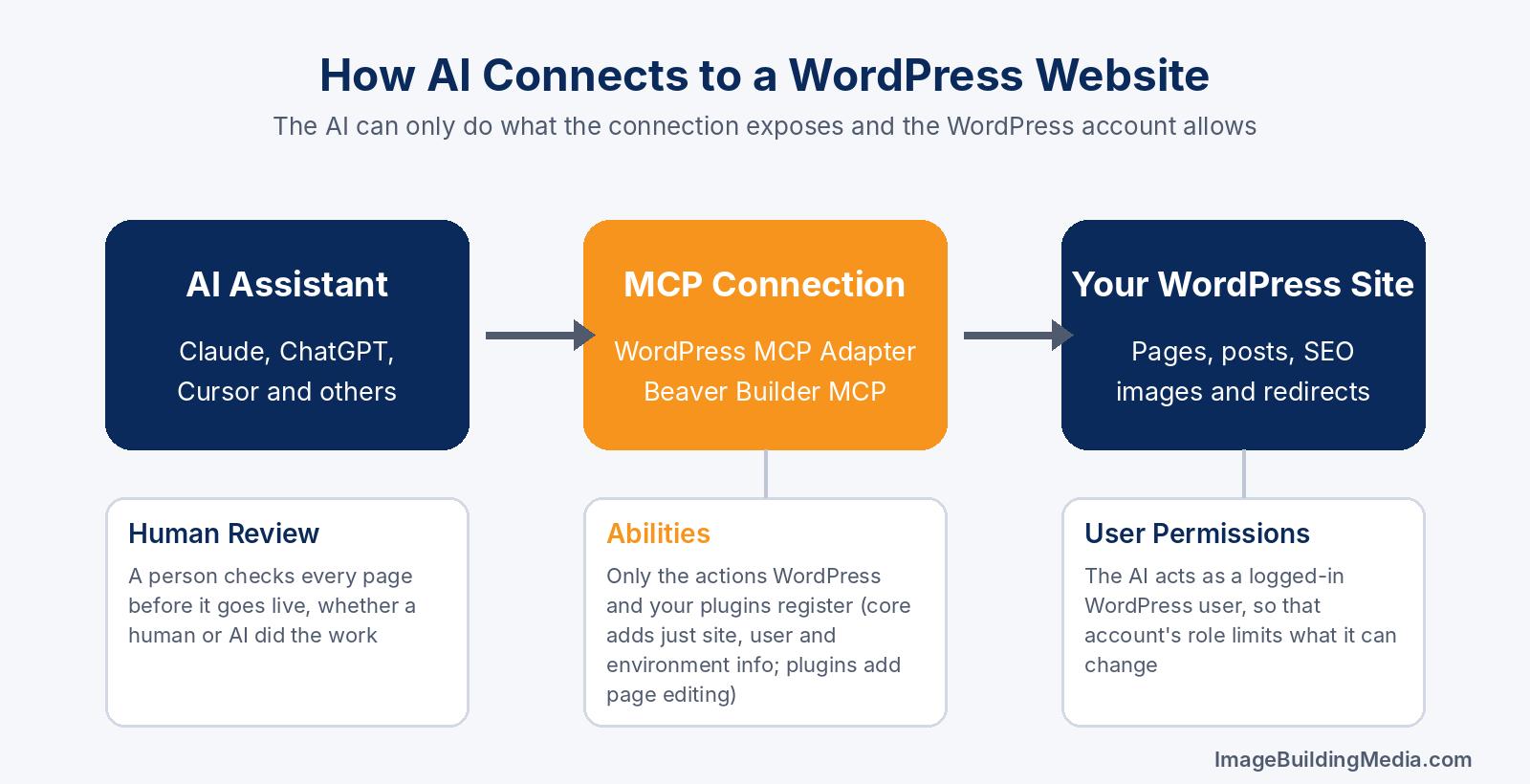
AI assistants that support MCP, such as Claude, can now connect directly to your WordPress site. What they can change depends on the abilities WordPress and your plugins make available.
To link outside AI assistants to WordPress sites, WordPress announced the official WordPress MCP Adapter on February 4, 2026, as part of its AI Building Blocks initiative. The announcement included setup examples for Claude Desktop, Claude Code, Cursor, and VS Code.
The MCP Adapter has no AI features of its own. What it exposes comes from the Abilities API, a registry of a site's capabilities. The adapter makes those abilities available to AI assistants that support MCP.
Through adapters like this, assistants such as Claude, ChatGPT, and Gemini can discover what a WordPress site can do.
WordPress page builders also offer AI integration. Beaver Builder AI, for example, offers three ways to work: a built-in chat, Design Kits, and an MCP connection. The MCP connection links an AI agent such as Claude Desktop, Cursor, or Codex directly to a WordPress site.
To keep access restricted, the Beaver Builder MCP connection settings are available only to site administrators and require a valid Beaver Builder license key.
Using AI That Works Inside the Web Browser
Sometimes you want an AI assistant working right inside your browser. That helps when it needs to look at a finished page or step through a series of web forms.
Anthropic's browser extension, Claude in Chrome, moved out of beta and became generally available on August 26, 2026, on all paid Claude plans. It runs inside your browser using your existing logins. It can view the page, read and type text, click links, move between pages, and fill out forms.
This gives you a second way to run repetitive updates across web tools that do not have a direct backend connection yet.
What We Use AI Website Design For
For us, Claude AI website design is used daily. For example, we connected our own agency website, ImageBuildingMedia.com, to Claude through the WordPress and Beaver Builder connections.
Through that connection, we recently built and published our Website Redesign Services and AI SEO Services pages. We also rebuilt our Website Maintenance Services page from the ground up. Additionally, we used Claude to rewrite an older Google Bard blog post, so it accurately covers Gemini.
Furthermore, we use the connection for SEO settings, images, image titles and alt text, internal linking across the website, and much more.
We bring the same workflow to client websites so their marketing budgets go further. Utilizing AI, our team and our clients can easily make changes to their website, including SEO optimization. To see how search visibility and page conversion work together, read our guide on What Is Website Marketing.
For example, on Butch's Hideaway, Claude performed deep SEO research first. Then it implemented that research by editing pages, setting up redirects, and writing the metadata. Afterward, the client also sent us raw information, and Claude used those notes to build the rates and rules pages.

Another client example is MyHomeTB.com, a real estate website with IDX that needed a dedicated landing page for an upcoming ad campaign.
Our client sent details about a new landing page he wanted. We gave the information to Claude, who created the Pre-Listing Home Review landing page and its companion thank-you page so the campaign could launch quickly.

What We Learned
I want to be honest about what can go wrong. While working with Claude on ImageBuildingMedia.com, one blog post was edited incorrectly and lost its page layout.
We stopped, found the exact cause of the formatting problem, and gave Claude a step-by-step internal procedure for correctly editing pages on our website. After that, everything worked perfectly.
As always, someone on our team checks every page before it goes live and makes changes as needed. AI speeds up the build, yet human quality control keeps our websites looking professional.
How Does AI Website Design Work in HighLevel?
In HighLevel, AI website design works through built-in tools: Ask AI, AI Studio, and Funnels & Websites AI. You can also pair HighLevel with an assistant like Claude to build pages at scale. The right workflow depends on whether you are launching a fresh standalone site or adding pages to an existing setup.
Ask AI
Ask AI in HighLevel is an assistant built into your account. With Funnel AI in Ask AI, you describe your business, audience, offer, and goal in a chat, and it builds the first version of a funnel, website, or landing page. If your request is vague, Ask AI asks follow-up questions and shows you a plan before it builds anything.
For now, Funnel AI in Ask AI only creates pages, so you finish them in the regular builder. Ask AI also works inside the Funnel and Website Builder. You can ask it to rewrite text, change the visual theme, or add a section, such as testimonials or FAQs, without rebuilding the rest of the page.
Nothing goes live on its own, so you still review the page and publish it yourself.
AI Studio
AI Studio in HighLevel is an AI-powered builder designed to take you from a blank screen to a working multi-page project. You describe what you want the site to include, and it generates the page layouts, written content, images, and multi-page structure.
You are not stuck with the AI's first guess. You can refine an AI Studio site in four ways:
- Typing new prompts to adjust sections, text, or layout flow.
- Using Visual Edits to click directly on elements in a live preview and edit them on the spot.
- Opening the built-in code editor for direct code adjustments.
- Stepping back through the version history to revert if an edit goes in the wrong direction.
When the site looks right, you publish it to a preview domain to test everything, then to your custom domain.
A common question is whether sites built with AI Studio can show up in search results. HighLevel's documentation lists the built-in SEO support: crawling and indexing settings, social share previews, and an automatic sitemap. Pages are also structured so AI search tools can read them, though none of this guarantees rankings.
Understand AI Studio's limits before choosing it for a website build. Projects created inside AI Studio cannot be moved into HighLevel's standard Funnels or Websites builders later. Plus, forms and calendars need an extra connection step to work.
HighLevel also measures AI Studio usage in 5-hour windows with plan limits, so you need to pace large builds accordingly.
Using Claude Through the HighLevel MCP Server
HighLevel also has an official MCP server. It lets AI assistants that support MCP, including Claude, connect directly to your HighLevel account.
That's how we built the Image Building Media support portal. Claude worked through the HighLevel MCP connection to create the tutorial pages, organize them into categories, and set up the home page. For a few steps the connection doesn't cover yet, Claude worked in the browser instead.
I've used HighLevel's Ask AI and AI Studio on past projects, but in my experience, Claude connected via the MCP server did a superior job on this project. Claude was able to create, edit, and publish all the pages. We didn't build any of them by hand; our team only reviewed them.
The result was about 170 pages in about 6 hours. I share the full numbers below.
Real AI Web Development Projects by the Numbers: How Much Time Does AI Save?
On our own builds, AI web development trimmed an estimated 100 man-hours off a 298-page WordPress redesign. It also turned a 170-page HighLevel portal into about 6 hours of work, versus a designer taking months. You can see more client results on our Case Studies page.
Moving a 298-Page Website to a New Builder
Our redesign for Tampa AC Services, a Tampa air conditioning company, shows where AI saves the most manual labor. Their old website had 579 pages built with Elementor, including 281 spammy pages that another SEO company had added. We removed those pages first and set up redirects. Our goal was to redesign the remaining 298 pages using Beaver Builder.
Elementor stores its own layout data and generates its own HTML structure. Moving pages to another builder means pulling the content out and rebuilding the layouts. Without AI, our team would have copied those 298 pages manually, or worked extensively editing the database, just to move the content.
Instead, we connected Claude to the site through the WordPress MCP connection and the Beaver Builder MCP connection. Claude did about 60% of the work, duplicating the pages onto the new site and stripping out the Elementor code cleanly.
Then our design team stepped in and put on the finishing touches. I estimate that saved us about 100 man-hours, and the new site is live today.

Building a 170-Page Support Portal in About 6 Hours
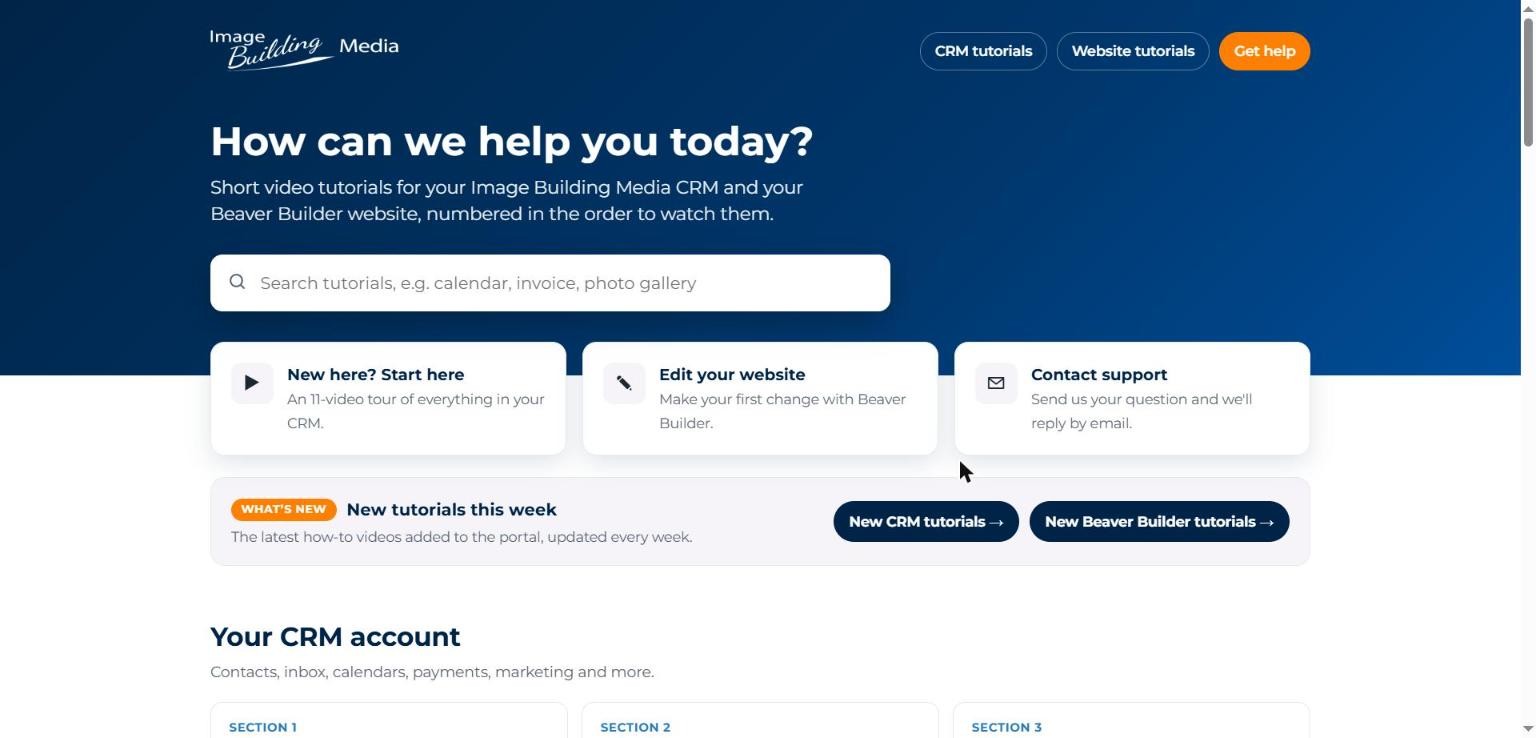
Another project was our own support portal at support.ImageBuildingMedia.com, a tutorial library where our clients find step-by-step answers and submit help requests. We built the entire portal in HighLevel with Claude in about 6 hours.
At launch, it had about 170 pages: 145 individual tutorials, 24 category pages, the main home page, and the client help form.
I estimate that completing the same work by hand, including all of the research, analysis, and page assembly, would take a designer 2 to 3 months.
Still, turning months of repetitive page building into a single workday changes everything. Most of all, it changes what's possible for businesses on a small budget.
Is It Safe to Let AI Work on Your Website?
Yes, the risk is manageable when you set up clear guardrails. Those include restricted user roles, manual approvals, staging and backups, spending caps, and human review of every page. If you connect an AI tool with full administrator rights on a live site and walk away, you risk broken layouts, security problems, or surprise charges.
Here is the four-step safety checklist we use and recommend for any business website.
Step 1: Lock Down User Roles and Permissions
When you connect an assistant through the WordPress MCP Adapter, the AI acts as a logged-in WordPress user and has whatever permissions that account has. Treat an AI connection like a new contractor logging into your backend.
In its official announcement, WordPress recommends three precautions for site owners:
- Use dedicated WordPress users or roles with limited capabilities, especially on live websites.
- Prefer read-only abilities on internet-facing endpoints so external connections cannot modify your content or settings.
- Log all AI usage so your team can review what actions were run and when.
Step 2: Guard Against Browser Prompt Injection
A browser extension like Claude in Chrome reads web pages and takes actions in tabs, so it carries a specific risk called prompt injection.
Anthropic explains that prompt injection means malicious instructions hidden in web pages, emails, or forms. They try to trick the agent into doing something you did not ask for.
Anthropic builds in several defenses: model training, probes that scan web content for hidden tricks, and a classifier that checks actions against your request. Even so, Anthropic states clearly that prompt injection remains an evolving threat.
You can turn off automatic approval in the extension and approve actions manually. We recommend manual approval whenever a browser agent is working near sensitive website settings or customer forms.
Step 3: Use Staging Sites, Drafts, Backups, and Human Review
Even without a security threat, an AI assistant can misunderstand a layout instruction and break a page, as happened on our own site. Build a safety net into your publishing workflow.
First, run major page builds or bulk code cleanup in drafts or on a staging copy of your site before pushing changes live. Second, keep reliable backups running on solid hosting infrastructure.
Third, make human review mandatory. We do this whether the website work was done by a human or AI.
Step 4: Set Monthly Spending Caps with Your AI Provider
Your final guardrail is financial. Depending on the setup, AI work is billed per token through an API key or counts against a subscription plan's usage limits.
The Beaver Builder AI plugin does not cap your AI usage inside the plugin. Beaver Builder advises users to set a monthly spending limit directly with their AI provider.
Where your provider offers it, set a spending limit and usage alerts, and watch usage during large projects.
Will AI Replace Web Designers?
Not in our experience. AI now handles much of the repetitive bulk work, while designers still handle brand strategy, layout judgment, and the finishing touches. If you are wondering whether AI will replace web designers, our client builds are the best answer I can give you.
On our 298-page migration for Tampa AC Services, Claude handled about 60% of the workload by duplicating pages and stripping out the old Elementor code. By my estimate, that saved about 100 man-hours of copying and code cleanup.
The website was not ready to launch when Claude finished its 60%. Our human design team refined the visual presentation and made sure every page worked for website users.
There is also a knowledge gap. In a Thryv survey reported by CPA Practice Advisor, 66% of small and mid-size businesses used AI. Yet 70% of owners said they need more training to use it well.
You probably do not want to spend your weekends learning WordPress user permissions, MCP connections, or page-builder code cleanup. That is where a designer or agency who pairs AI speed with human craftsmanship earns their keep.
How Does AI Help with Ongoing Website Maintenance?
For ongoing website maintenance, AI can help you publish fresh content every week and quickly update outdated pages. In our experience, bulk changes across hundreds of pages can take minutes rather than days, depending on the change and the review needed.
As an example, look at how we maintain our support portal at support.ImageBuildingMedia.com today. It launched with 145 tutorials and now has 155.
A weekly AI task automatically adds up to 10 new tutorials and replaces any videos that have been removed, and we review them before they go live. And when we wanted to remove a "Next up" section from all 155 tutorials, the bulk edit across the entire portal took about 15 minutes.
We run similar improvements on WordPress sites, like rewriting an older Google Bard post for Gemini and updating our internal links, images, and alt text.
FAQs
Conclusion
Putting AI to work on your WordPress or HighLevel website doesn't mean setting up the connections, permissions, and quality checks yourself. At Image Building Media, we offer three ways to work together.
- First, we can do it all for you, handling design, redesign, SEO implementation, and ongoing maintenance from start to finish.
- Second, we can train your team to use these AI workflows safely on your own site.
- Third, we can set up a hybrid partnership where our agency handles the technical setup and major builds while your staff handles everyday updates.
Want to clean up an older website or get more done each month? Check out our Website Redesign Services and Website Maintenance Services, then contact us for a customized plan.
Resources for Additional Research
- From Abilities to AI Agents: Introducing the WordPress MCP Adapter: WordPress Developer Blog
- Beaver Builder AI Chat vs MCP vs Design Kits: Beaver Builder
- Claude in Chrome is generally available: Anthropic
- SMB AI Use Continues to Rise, But They Need Help: CPA Practice Advisor
- Half of Small Business Workers Use AI: U.S. Chamber of Commerce Foundation
Newsletter: Sign Up