
Chrome’s ‘Mimic Site’ Alert: Domain Typosquatting
The difference between a legitimate website and a malicious imposter can be as little as a single letter in the domain name. Cybercriminals employ subtle deceptions like these to deceive users, compromise data, and tarnish well-established brand reputations. Google Chrome is now fighting back with a proactive pop-up warning designed to stop a particularly insidious threat: typosquatting.
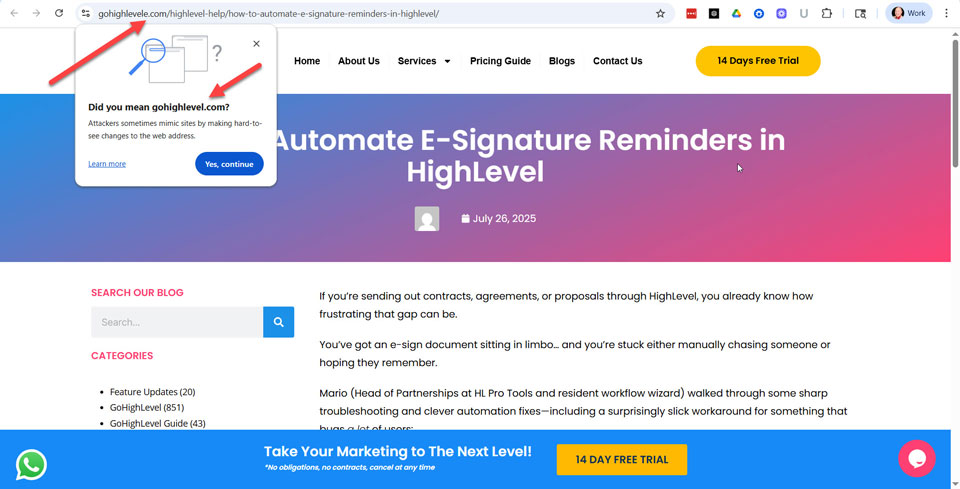
This article breaks down Chrome's "Did you mean?" warning, using a real-world example of a mimic site targeting users of the popular platform GoHighLevel. We will analyze the anatomy of the deception and explore the critical implications for SEO professionals and brand managers. This is a security battle with direct consequences for your traffic and customer trust.
Key Takeaways
- Chrome's Warning Fights Typosquatting: The "Did you mean?" pop-up is a key feature of Google Safe Browsing designed to stop users from landing on malicious sites that mimic legitimate domains through common misspellings.
- Deception is in the Details: Attackers rely on subtle tricks, like adding a single letter to a URL or copying a brand's favicon, to make fake sites appear trustworthy and deceive users at a glance.
- SEO and Revenue Are at Risk: Typosquatting directly harms your business by stealing high-intent, branded traffic, which leads to lost conversions, skewed analytics, and significant damage to customer trust.
- Proactive Defense is Crucial: Brands must actively protect themselves by defensively registering common domain misspellings, monitoring for new threats, and using official channels like UDRP to take down malicious sites.
What is Google Chrome's "Did You Mean?" Pop-Up Warning?
Google's warning system represents a significant step forward in real-time user protection, moving beyond passive blacklists to actively intervene before a user lands on a suspicious site. This feature is designed to interrupt the user's journey just long enough to make them reconsider their destination. It addresses the common and costly mistake of URL typos.
A Frontline Defense Against Typosquatting
Typosquatting, also known as URL hijacking, is the deliberate registration of domain names that are common misspellings of popular websites. Attackers register domains like "Gooogle.com" or "Amazan.com" to prey on simple typing errors. Their goal is to siphon off legitimate traffic for malicious purposes.
These fake sites are often used for phishing scams to steal login credentials, distribute malware, or run affiliate scams that generate revenue for the attacker. According to a recent report, malicious typosquatting domains target nearly every industry, with a significant focus on finance, technology, and retail. This tactic exploits user trust in established brands to execute an attack.
Google Documentation: Manage warnings about unsafe sites
How the Warning Mechanism Works
When a user types a URL that Chrome's security algorithms identify as a likely misspelling of a high-traffic site, a pop-up appears. It interrupts the page load to ask, "Did you mean [correctsite.com]?" A stark warning follows this simple question: "Attackers sometimes mimic sites by making hard-to-see changes to the web address."
The user cannot proceed to the suspicious site without making a conscious choice to click "Yes, continue." This intentional friction is a powerful defense mechanism. It prevents users from automatically landing on a potentially harmful site and gives them a critical moment to spot the error.
Anatomy of a Deception: The "GoHighLevele.com" Case Study
The effectiveness of typosquatting lies in its subtlety, preying on users who are multitasking or browsing quickly. The case involving a mimic of the GoHighLevel marketing platform is a perfect example of how minor changes create major risks. It highlights the layered techniques attackers use to build a convincing illusion.
The Power of a Single Extra Letter
As seen in the warning triggered by this case, the attacker registered GoHighLevele.com, adding just one extra "e" to the end of the legitimate GoHighLevel.com domain. To the hurried eye, especially on a small mobile screen, this change is nearly invisible. This is a classic social engineering tactic that exploits our brain's tendency to see what it expects to see.
The attacker is betting on the user's familiarity with the brand to override their attention to detail. This single-letter difference is all it takes to divert a potential customer to a phishing page. It's a low-effort, high-reward strategy for cybercriminals.
The Deceptive Favicon: Building a False Sense of Security

GoHighLevel.com Favicon
Click Image to Enlarge

Domain Typosquatting Favicon
Click Image to Enlarge
To complete the illusion, the attacker copied the official GoHighLevel favicon, the small icon that appears in the browser tab. This is a crucial detail that makes the malicious site appear legitimate at a glance. Users often rely on this visual cue to confirm they are in the right place.
By mirroring the favicon, the attacker ensures that even if a user has multiple tabs open, the fake one doesn't stand out. This reinforces the false sense of security and makes the user less likely to double-check the URL bar. It's a simple step that greatly increases the scam's chances of success.
Inside the Engine: What Google's Support Page Reveals
This pop-up warning is not a simple spell-checker; it's an integrated part of a much larger and more sophisticated security apparatus. Google leverages its vast data and machine learning capabilities to power this real-time threat detection. Understanding the technology behind it reveals the depth of the protection it offers.
Powered by Google Safe Browsing
The mimic site warning is a feature of Google Safe Browsing, a massive security initiative that identifies and flags unsafe websites across the web. Safe Browsing protects over five billion devices every day by showing warnings to users before they visit dangerous sites or download harmful files. It uses advanced analysis to detect malware, phishing schemes, and other online threats.
This specific typosquatting protection cross-references the URL a user enters against popular sites, looking for common patterns used by attackers. It's an intelligent system that learns and adapts as criminals change their tactics. This connection is detailed on Google's own technology page for Safe Browsing.
Google's Official Guidance on Unsafe Site Warnings
Google's support page for this feature, titled "Manage warnings about unsafe sites," explicitly states these alerts are designed to protect users from phishing and social engineering. It's a core component of Chrome's "Enhanced Protection" mode, the browser's highest level of security. While users have the option to disable these warnings, Google strongly advises against it.
This official guidance confirms the feature's role as a critical security layer. It empowers users by not only blocking a threat but also educating them about the nature of the attack in real-time. This helps build user awareness and a more resilient online community.
Why This Warning Matters for SEOs and Brand Managers
While Chrome's warning is a user-facing security feature, it has direct and significant implications for SEO professionals and brand managers. Typosquatting is not just a cybersecurity issue; it's a direct attack on your brand's traffic, reputation, and revenue. Ignoring it means allowing a malicious actor to become your invisible competitor.
Defending Brand Reputation and Customer Trust
A successful typosquatting campaign can cause immense damage to a brand. If a customer's login credentials are stolen from a mimic site, they will associate that negative experience with your brand. This can lead to a rapid erosion of trust that is difficult and expensive to rebuild.
The potential fallout includes financial loss for customers, the distribution of malware from sites bearing your name, and negative press.
Protecting your customers from these threats is synonymous with protecting your brand's reputation. Therefore, it's an essential part of modern digital stewardship.
The Tangible Impact on Traffic, Leads, and Conversions
From an SEO perspective, every visitor who lands on a typosquatted domain is a lost opportunity. This is high-intent, branded traffic (users who were actively trying to reach your site) being siphoned away.
The mimic site is stealing your qualified leads and potential sales. It can also interfere with your analytics, making it more difficult to obtain a clear picture of your actual traffic and user behavior. This makes typosquatting a direct threat to your marketing ROI.
Actionable Strategies for Proactive Brand Protection
Brands cannot afford to be passive. A proactive defense is the only way to mitigate the risks of typosquatting and protect your digital assets. Here are several steps businesses should take:
- Defensive Domain Registration: Proactively register common misspellings of your domain, as well as different top-level domain (TLD) variations.
- Implement Brand Monitoring: Use services that automatically scan for new domain registrations that are confusingly similar to your brand name.
- File Takedown Notices: When a malicious site is discovered, report it to Google Safe Browsing and utilize formal processes, such as the Uniform Domain-Name Dispute-Resolution Policy (UDRP), to have it taken down.
- Educate Your Customers: Remind users in your communications to always double-check the URL and bookmark your official site for future visits.
Conclusion
Google Chrome's "Did you mean?" pop-up is a vital and intelligent tool in the ongoing fight against typosquatting. It provides a crucial layer of defense against deceptive attacks that leverage subtle misspellings to cause significant harm to users and brands alike.
However, this feature is not a complete solution. The ultimate defense is a combination of advanced browser security, proactive brand protection, and vigilant user behavior.
For SEOs and brand managers, this warning is a clear signal that a modern digital strategy must include active cybersecurity measures, which are fundamental to maintaining customer trust and ensuring that your hard-earned traffic reaches its intended destination.
Resources for Additional Research
- Google: Manage warnings about unsafe sites
- Google: Safe Browsing
- ICANN: Uniform Domain-Name Dispute-Resolution Policy (UDRP)
- WIPO: Domain Name Disputes
- Unit42 Palo Alto Networks: Cybersquatting: Attackers Mimicking Domains of Major Brands Including Facebook, Apple, Amazon and Netflix to Scam Consumers
Newsletter: Sign Up